Require Browser Login
What it does
By default, anyone who can reach your PrinterMon node on the network can use the dashboard, and any slicer can push files without credentials. Require Browser Login closes both of those.
With the toggle on:
- Web UI. Every visitor must sign in with a PrinterMon.com account that belongs to the node's organization.
- API and slicer uploads. The same gate applies to /api/* endpoints. Slicers must authenticate with the OctoPrint/Klipper API Key shown directly below the toggle (or use an X-Api-Key header / apikey query parameter that matches it).
- Multi-User and Remote Tunnel Connections. These features require Require Browser Login to be on. They stay disabled until you flip the toggle.
Enable the toggle
Account Section
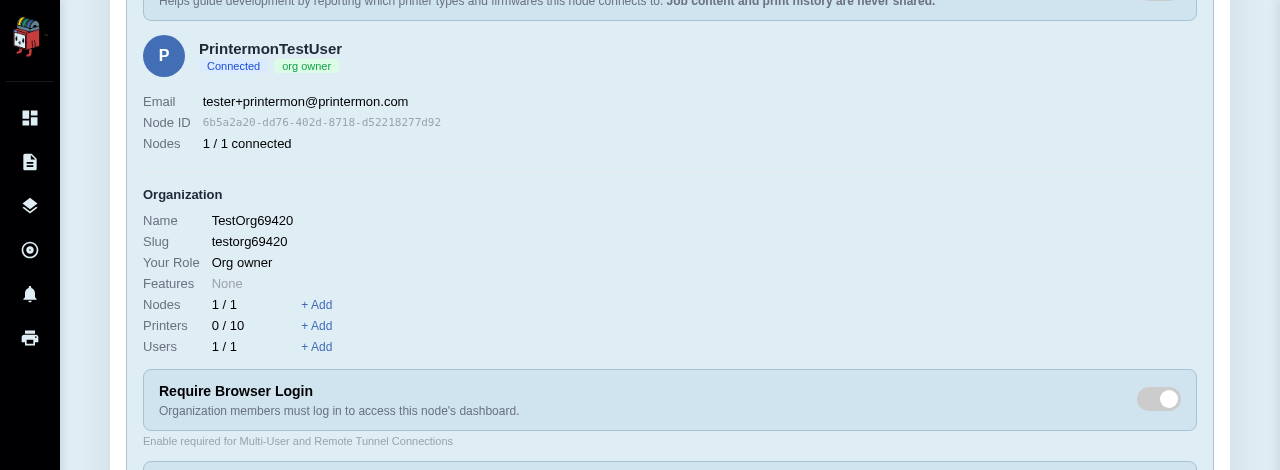
Sign in to the node. Open Settings and stay on the General tab. Scroll to the Account section. The Require Browser Login row is below the Organization details. Flip the toggle. The change applies immediately. Any open browser tabs that were not signed in get bounced to the login page on their next request.
Reconfigure your slicers
The moment you turn the toggle on, any slicer that was uploading to this node in open mode will start getting 401 Unauthorized. The fix is to copy the node's OctoPrint/Klipper API Key (shown in the same Account section, right under the toggle) into the slicer.
For step-by-step instructions in OrcaSlicer, PrusaSlicer, and Cura, see Connect Your Slicer.
If a slicer's key gets compromised, click Regenerate next to the key. The old key stops working immediately, and you re-paste the new value into each slicer.
What it does not do
- It does not affect connections from the printers themselves. Printers continue to use their own protocol-specific credentials (PrusaLink password, Bambu access code, Klipper Moonraker keys, etc.).
- It does not block external traffic on its own. If your node is exposed to the internet, you still need a real firewall or Tailscale in front of it. Require Browser Login is an authentication layer, not a network firewall.
Disabling it
Flip the toggle off and the node returns to open mode. All sessions are dropped. Slicers configured with the API key continue to work (the key is still valid; the API just stops checking). Multi-User and Remote Tunnel become unavailable again.